


Logo

CueSplit for Mac

Split FLAC & APE albums into tagged tracks

Open a single-file lossless album and its cue sheet, fix garbled names and tags, listen to any track, then split it into one properly tagged file per track.

Download on the Mac App Store Download for Mac
brew install galaco/tap/cuesplit

Free · macOS 14 or later · Apple silicon and Intel · Notarized by Apple

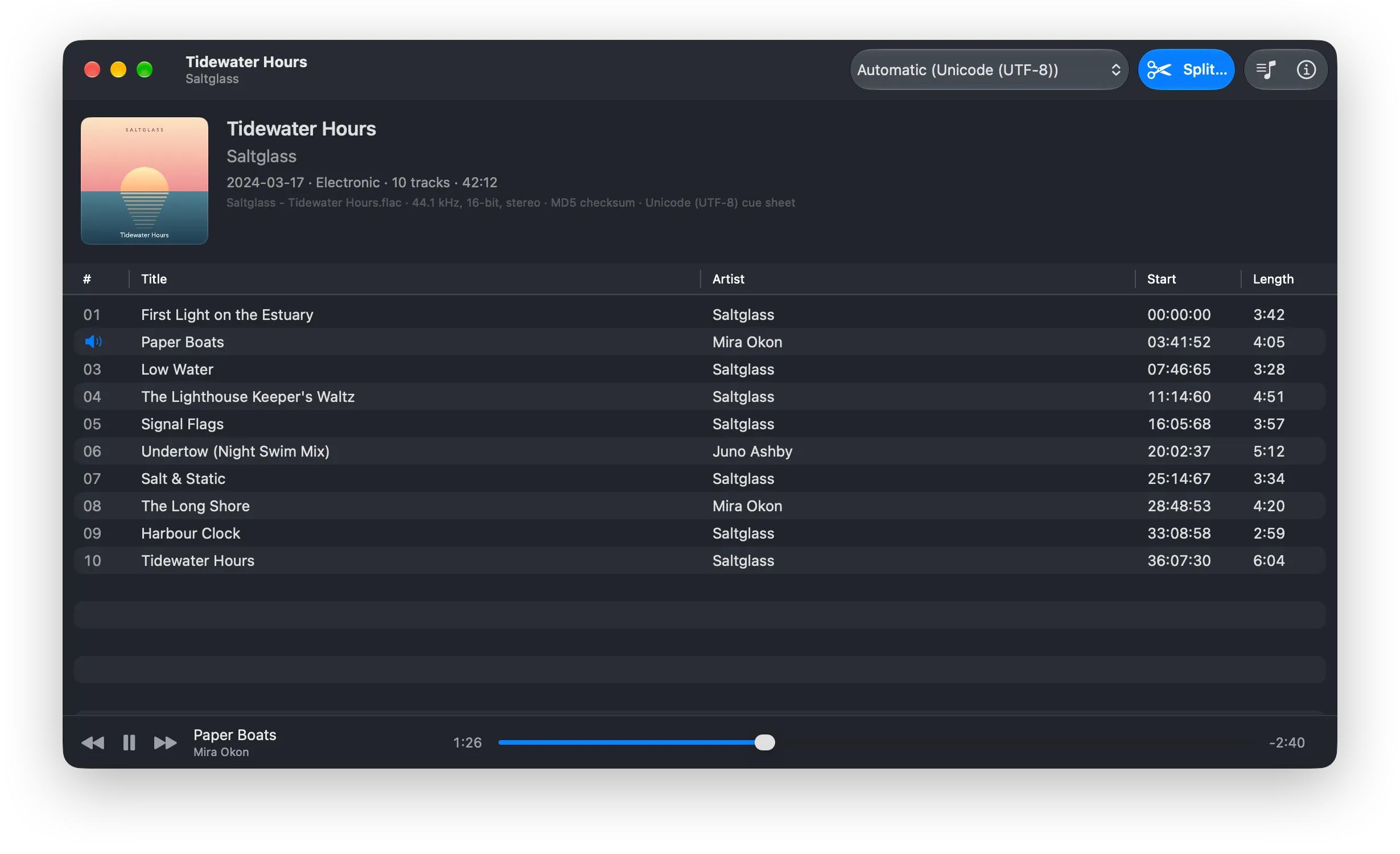
CueSplit showing an album’s track list and cover art, with a track playing

How it works

A CD image keeps a whole album in one file. CueSplit turns it into the tracks your player expects.

  1. 1

    Open the album

    Drop a cue sheet on the window. A FLAC or APE file with its cue sheet embedded works too, as does a whole folder.

  2. 2

    Check it over

    Fix garbled names by switching the encoding, edit tags and cover art, and play any track to hear where it starts.

  3. 3

    Split

    Save every track, or only the ones you select, as FLAC, Apple Lossless or AAC, or add them straight to Music.

Made for real-world rips

Cue sheets come from every ripper, in every language. CueSplit handles the awkward parts.

Garbled names, fixed

Cue sheets are saved in all kinds of text encodings. CueSplit detects which one automatically, and if names still look wrong, pick another and see the result straight away.

  • UTF-8
  • UTF-16
  • Shift-JIS
  • EUC-JP
  • GB18030
  • Big5
  • EUC-KR
  • Windows-1251
  • Windows-1252

Every tag kept

Tags from the cue sheet are merged with the ones already in the audio file, including foobar2000’s per-track tags and embedded cover art, so composers, BPM and catalog numbers survive the split.

Edit any tag

Change any field for the whole album or only the selected tracks. Drop an image on the cover to replace it, undo, or go back to the original. You can save a corrected cue sheet too.

FLAC, Apple Lossless or AAC

FLAC at compression levels 0 to 8, Apple Lossless, or AAC from 128 to 320 kbps, in a new album folder if you like.

Checked, every time

Every frame’s checksum is checked as the album is read, and every saved track is compared with the original audio. Files only appear once they’ve passed, so a failed or cancelled split leaves nothing behind.

Straight into Music

Add the whole album, or a few tracks, to your Music library as Apple Lossless or AAC, with their tags and cover art.

The details, handled

  • Pregaps at the end of the previous track, the start of their own, or left out
  • Hidden audio before track 1 saved as track 00, or kept with track 1
  • Cue sheets that span several audio files
  • Dates tidied to YYYY-MM-DD, and EAC’s '' turned back into quotation marks
  • Space to play, ⌘← and ⌘→ to move between tracks
  • In English, Japanese, Korean, Chinese, French, Spanish and Portuguese

Private by design. CueSplit runs entirely on your Mac. It’s sandboxed, never connects to the internet and collects no data.

Privacy policy

Also on the command line

cuesplit does the same splitting from Terminal, for scripts and whole shelves of albums. It reads the same cue sheets, keeps the same tags and checks every track the same way, with --json output for scripts.

brew install galaco/tap/cuesplit-cli

Homebrew also installs its man page and zsh, bash and fish completions.

Terminal
# FLAC, next to the cue sheet
$ cuesplit album.cue
# Apple Lossless, into ~/Music
$ cuesplit album.cue -o ~/Music --alac
# several albums as 256 kbps AAC
$ cuesplit */*.cue --aac -b 256
# the tracks and tags, without splitting
$ cuesplit info album.cue

Get CueSplit

Free from the Mac App Store, GitHub and Homebrew. Runs on macOS 14 or later, on Apple silicon and Intel Macs.

Homebrew

Install the app or the command-line tool, and update them with brew upgrade.

brew install galaco/tap/cuesplit
brew install galaco/tap/cuesplit-cli

Mac App Store

Install it from the App Store, and get its updates there too.

Questions

How do I split a FLAC file with a cue sheet on a Mac?

Open the .cue file in CueSplit, or drop it on the window. Check the track names and tags, then choose Split… (⌘S). CueSplit saves one tagged file per track, in a new album folder if you like.

Why are the track names in my cue sheet garbled?

The cue sheet was saved in a different text encoding from the one your software assumed: often Shift-JIS for Japanese releases, or GB18030 or Big5 for Chinese ones. CueSplit detects the encoding automatically, and its encoding menu lets you switch and see the result straight away.

Does splitting reduce the audio quality?

Not as FLAC or Apple Lossless: each track holds exactly the original audio, and CueSplit compares it with the source to make sure. AAC is lossy, for when smaller files matter more.

Which files can CueSplit open?

Albums ripped to a single FLAC or APE (Monkey’s Audio) file, with the cue sheet beside it or embedded in the audio file. Cue sheets that refer to several audio files work too.

Is CueSplit free?

Yes. It’s free from the Mac App Store, GitHub and Homebrew, and so is the command-line tool.